Close Menu

    Subscribe to Updates

    Get the latest creative news from FooBar about art, design and business.

    What's Hot

    The Funded Room Review 2026 – Traderoom Rules, Profit Split & Payout Explained

    February 26, 2026

    Realme P4 Power Review – 10,001mAh Battery Beast with 144Hz AMOLED

    February 17, 2026

    Best 5G Phones Under ₹15,000 in India (2026) – Top 10 Budget Picks

    February 17, 2026
    Facebook X (Twitter) Instagram
    ARYMobiles
    • Home
    • News
    • deal
    • Products Finder
    • Compare
    • Reviews
    • Comparison
    • Brands
    • Guides
    Login
    ARYMobiles
    Home - News - Windows 10 Support Ends October 14 — How to Get an Extra Year Free
    News

    Windows 10 Support Ends October 14 — How to Get an Extra Year Free

    Shushil KumarBy Shushil KumarOctober 11, 2025Updated:October 14, 2025No Comments3 Mins Read
    Facebook Twitter Pinterest LinkedIn Email WhatsApp Bluesky Tumblr Reddit VKontakte Telegram Threads Copy Link
    Follow Us
    Facebook X (Twitter) Instagram WhatsApp Google News Reddit Telegram Threads
    Windows 10 Support Ends October 14 — How to Get an Extra Year Free
    Share
    Facebook Twitter LinkedIn Pinterest Email WhatsApp Reddit

    Microsoft is finally pulling the plug on Windows 10 support this October 14, marking the official end of life for the popular operating system. While your PC will still work after the deadline, it will stop receiving critical security updates, leaving it vulnerable to new threats.

    But here’s the good news — Microsoft’s Extended Security Updates (ESU) program gives you another free year of protection. That means you can safely keep using Windows 10 until 2026 while deciding your next move.


    🧩 What Are Your Options?

    Once support ends, you have three main choices:

    1. Upgrade to Windows 11 – Free for compatible PCs.

    2. Buy a new PC – Preloaded with Windows 11 (or switch to a Mac or Chromebook).

    3. Stay on Windows 10 – Enroll in the Extended Security Updates (ESU) program for another year of updates — now free for most users in the U.S.
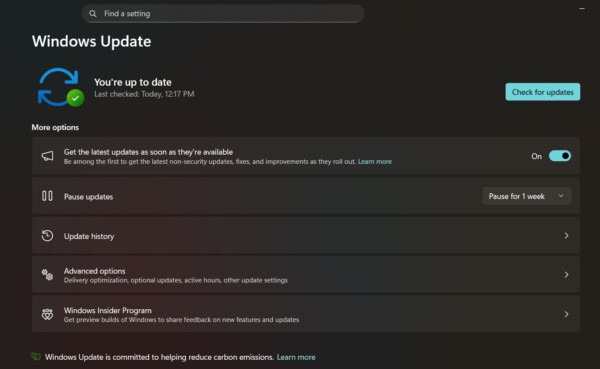
    Windows 10 support ends on October 14, 2025. Learn how to extend updates for another year with Microsoft’s free Extended Security Updates (ESU) program.
    Find out if you need to update your computer. (Screenshot/ARYMobiles)

    🔐 How to Get Extended Security Updates (ESU) for Free

    If your PC isn’t ready for Windows 11, this method keeps you protected.

    Step 1: Update Your PC

    Go to Settings → System → About to check your current version. Install any pending updates before proceeding.

    Step 2: Use an Administrator Account

    Make sure you’re logged in as an administrator — the first account created on your PC usually is.

    Step 3: Check Windows 11 Eligibility

    If your system supports Windows 11, you’ll see an upgrade option. Otherwise, continue with ESU enrollment.

    Step 4: Enroll in ESU

    Head to Settings → Update & Security and select Enroll Now under the ESU banner.
    If the option doesn’t appear, make sure your device has the latest Windows 10 patches installed.

    Step 5: Choose a Backup Option

    Before enrolling, back up your data. Microsoft offers 5 GB of free OneDrive storage — just enough for most users. If you’ve already connected your PC with a Microsoft account (for OneDrive, Office, or Game Pass), setup is simple.

    💡 Tip: You can disable unneeded backups (like Pictures or Videos) to stay under the free limit.

    Click Add Device when prompted, then Done — and that’s it! Your PC is now enrolled in ESU, giving you 12 more months of security updates.


    🕒 What Happens Next?

    You’ll have until October 2026 to plan your next step — whether it’s upgrading to Windows 11 or exploring another OS.

    So, if you’re not ready to say goodbye to Windows 10 just yet, the Extended Security Updates program is the perfect way to buy more time — safely and for free.

    Also Read: 7000 mAh Battery Phones with AMOLED Display

    For the latest mobile news, reviews, and deals, follow ARYMobiles on Google News, X, Facebook, WhatsApp, and Threads. Stay updated with the newest gadgets by subscribing to our YouTube channel. Want to explore top influencers in the tech world? Follow Who’s ThatARY on Instagram and YouTube

    Share. Facebook Twitter Pinterest LinkedIn Email Reddit Telegram WhatsApp Threads

    Related Posts

    Infinix Note Edge Launch on 18 Feb: 1.5K Curved AMOLED, 6500mAh Battery, 45W Charging

    February 16, 2026

    Oppo K14x 5G Launched in India: ₹14,999 Price, 6500mAh Battery & Full Specs

    February 10, 2026

    PlayStation 6 Leaks Shock Gamers: 30GB RAM, Early 2026 Launch & India Price Revealed!

    February 10, 2026

    Motorola Razr Fold vs Galaxy Z Fold 8: 200MP Camera, 8.1″ Display – Shockingly Different!

    February 9, 2026
    Leave A Reply Cancel Reply

    New Arrivals
    • Vivo iQOO 15 Ultra Vivo iQOO 15 Ultra
    • OPPO Reno15 OPPO Reno15
    • OPPO Reno15 Pro OPPO Reno15 Pro
    • OPPO Reno15 Pro Mini OPPO Reno15 Pro Mini
    • Samsung Galaxy A07 Samsung Galaxy A07
    • Samsung Galaxy M17 Samsung Galaxy M17
    Top Posts

    The Funded Room Review 2026 – Traderoom Rules, Profit Split & Payout Explained

    February 26, 202610 Views

    Best 5G Phones Under ₹15,000 in India (2026) – Top 10 Budget Picks

    February 17, 20262 Views

    7000 mAh Battery Phones with AMOLED Display

    September 2, 20252 Views
    Don't Miss
    General

    The Funded Room Review 2026 – Traderoom Rules, Profit Split & Payout Explained

    By ls3888126@gmail.comFebruary 26, 20260

    The Funded Room Complete Guide 2026 Instant Funding | One-Step Evaluation | Two-Step Evaluation |…

    Realme P4 Power Review – 10,001mAh Battery Beast with 144Hz AMOLED

    February 17, 2026

    Best 5G Phones Under ₹15,000 in India (2026) – Top 10 Budget Picks

    February 17, 2026

    Infinix Note Edge Launch on 18 Feb: 1.5K Curved AMOLED, 6500mAh Battery, 45W Charging

    February 16, 2026
    Stay In Touch
    • Facebook
    • YouTube
    • WhatsApp
    • Twitter
    • Instagram
    Most Popular

    The Funded Room Review 2026 – Traderoom Rules, Profit Split & Payout Explained

    February 26, 202610 Views

    Best 5G Phones Under ₹15,000 in India (2026) – Top 10 Budget Picks

    February 17, 20262 Views

    7000 mAh Battery Phones with AMOLED Display

    September 2, 20252 Views
    Our Picks

    The Funded Room Review 2026 – Traderoom Rules, Profit Split & Payout Explained

    February 26, 2026

    Realme P4 Power Review – 10,001mAh Battery Beast with 144Hz AMOLED

    February 17, 2026

    Best 5G Phones Under ₹15,000 in India (2026) – Top 10 Budget Picks

    February 17, 2026

    Subscribe to Updates

    Get the latest creative news from FooBar about art, design and business.

    Facebook X (Twitter) Instagram YouTube Pinterest
    • Home
    • Contact Us
    • Terms of Use
    • Affiliate Disclaimer
    • About Us
    • Privacy Policy
    © 2026 ARYMobiles.com

    Type above and press Enter to search. Press Esc to cancel.

    Sign In or Register

    Welcome Back!

    Login below or Register Now.

    Lost password?

    Register Now!

    Already registered? Login.

    A password will be e-mailed to you.